
See what your sound is made of
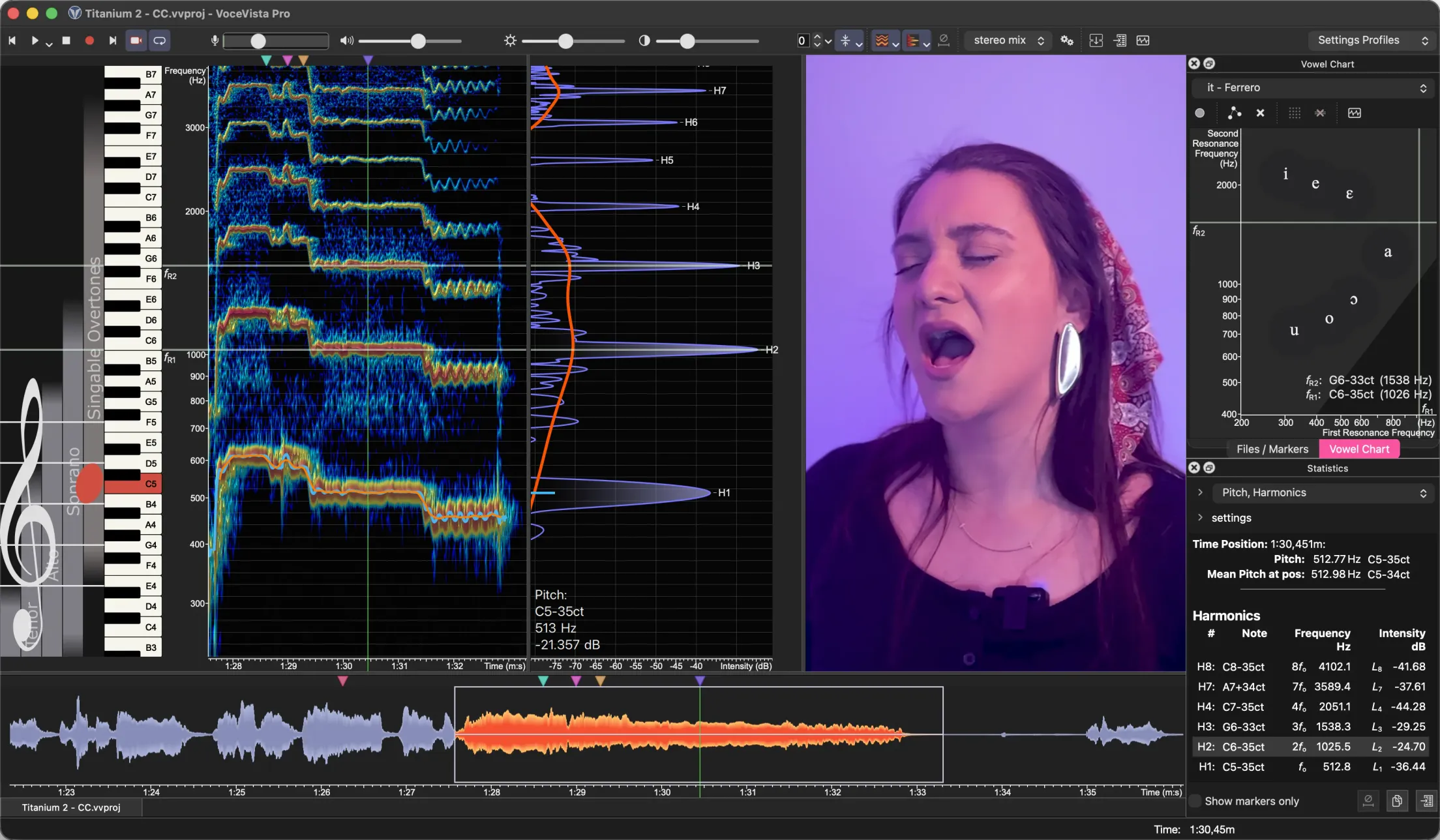
VoceVista is a high-resolution, real-time sound spectrum analyzer with a musical interface. The VoceVista Video edition adds integrated video, so you can play and inspect a performance frame by frame, in sync with its sound. Built for singers, instrumentalists, teachers, and anyone curious about sound.
Available in three editions, for Windows and macOS.
Two questions, one tool
Almost everything you work on as a singer or instrumentalist comes back to two questions. VoceVista is built to answer both, in real time and side by side.
Which note am I singing or playing?
See the fundamental pitch on a musical staff and a piano keyboard. Track intonation, vibrato and melody as you go.
How am I singing or playing it?
See how loud you are at every moment: the intensity. Then read the timbre: the harmonics, resonances, and formants that give every note its tone color.
See it in action
A few of the views you'll be working with. Each one brings out a different aspect of your sound and gives you something to act on.
VoceVista is optimized for real-time visualization. The spectrogram scrolls smoothly at the display's full refresh rate (120 Hz on a current MacBook Pro), and VoceVista Pro resolves the signal into over a million FFT bins, fine enough for detailed analysis of inharmonic sounds like singing bowls and gongs. See the technical specifications → Microphone recommendations →
Measure. Understand. Learn.
VoceVista is built around a simple working cycle. Use each step on its own, or run all three as a continuous loop.
Measure
Record & analyze with precision: pitch, vibrato, harmonics, formants.
Understand
Make sense of it: visualizations, theory, a built-in sound generator.
Learn & practice
Apply it with a visual mirror that gives immediate feedback.
↻ then repeat the loop
Who is it for?
Singers
Practice pitch and intonation, develop vibrato and vowel color, refine your technique.
Singing teachers
A mirror for the voice that shows students what they are actually doing.
Voice therapists
Monitor client progress and add a sensory feedback channel to your exercises.
Instrumentalists
Check intonation, analyze tone, compare instruments, mouthpieces, and setups.
Instrument builders & tuners
Measure and analyze instruments with high precision and detail.
Choir conductors
Work on blend, intonation, timbre, and vowel uniformity across the ensemble.
Composers & arrangers
Ground choices about register, scoring, and timbre in the sound itself.
Musical theorists
Explore intervals, scales, and tuning systems through the natural relationships between tones.
Overtone musicians
Study and improve your technique with direct visual feedback on your own harmonics.
Find the edition that fits you
Three editions, one tool, from everyday practice to pro-grade measurement. Compare what each one does, then start a free 30-day trial.