new Advanced Setting to autostart recording at program startup
new Advanced Setting to clear recording periodically and start over (for running VVV indefinitely in unattended mode)
new Advanced Setting to close files without confirmation, for those people that only want to use VVV for real-time analysis and are not interested in saving recordings as files
always list available ASIO input devices
Fixes
Fix crash when moving frequency filter to upper frequency range limit
[macOS] Fix leaving full-screen mode by pressing the green window frame button
Spectrogram Timescale doesn’t update when moved with the mouse
https://www.vocevista.com/img/VoceVista_WebLogo156a.png00Bodo Maasshttps://www.vocevista.com/img/VoceVista_WebLogo156a.pngBodo Maass2022-09-20 22:35:262022-09-20 22:35:26VoceVista Video 5.6.1
This release focuses mainly on stability, performance, and usability. The most significant new feature is the possibility to set an upper frequency limit on the pitch detection, which makes the pitch detection much more useful for working with speech. Also, there are new presets for the Analyzer Settings to toggle between working with singing, speech, and instruments. Another important new feature is crash recovery. This will restore all unsaved recordings after a power failure, system crash, or other unplanned program exit. On Windows, the default audio driver is now WASAPI, which offers much smoother scrolling during recording than DirectSound.
recovery of last recording after a crash or power failure
set highest detected pitch for better analysis of speech
profile support for Analyzer Settings, with presets for singing, speech, and instruments
Options/Preferences dialog is now modeless, so the app can be used while the options windows is open
Preferences dialog layout has been overhauled for macOS to be more compact and use less screen space
on Windows, WASAPI is now the default recording system for reduced latency and smoother scrolling during recording
Sound Generator can generate click tracks
Sound Generator can generate custom melodies
profile manager shows list of existing categories, for better organization of long profile lists
detect Windows Sleep mode to stop recording when laptop gues to sleep to prevent power drain
improved diagnostic output in log file
Manage License dialog links to license page to allow resetting the activation counter
update Windows installer to use latest dependencies
Fixes
show mean pitch analysis even when vibrato is not enabled
enable spectrum when pitch analysis is enabled
fix LTAS line color for colormaps with white background
We are proud to release VoceVista Video (Pro) and Overtone Analyzer 5.5.0. Apart from numerous general fixes and refinements, this release focuses heavily on improving the Sound Generator in order to make it easier to model and understand vowel adjustments during pitch changes. We will soon create new tutorials and examples that explain this in more detail.
Another focus of this release has been to fully support the latest versions of macOS and Windows, and to generally improve performance and stability of the software.
New Features
support for macOS Monterey (minimum required macOS Version is now macOS Mojave 10.14)
support for Windows 11 (minimum required Windows Version is now Windows 10)
Color Legend
improved Full Screen mode
improve accuracy of colormap interpolation to enhance visual quality of spectrogram and spectrum
New colormaps: Jet, CMRMap, Inferno, Viridis, Plasma, Magma
revise Analyzer Output options dialog
make drawing of unfiltered spectrum optional
review Main Menu and Context Menus
review and simplify the View menu
move various ruler-related entries to the Filters menu
synchronize the context and menu-button menus for spectrogram and spectrum
on tab context menu, rename “close all but active” into “close other tabs”
revise Sound Generator UI
allow to import custom melodies from overtone sliders
new feature to apply pitch curve to resonance path for simulating vowel adjustments during pitch changes
add command for deleting all resonance path nodes
refactor rulers and resonance lines
Model Resonance Curve
ability to sync rulers across files
separate stationary rulers and resonance rulers
rulers can be moved with the mouse on the Spectrogram and Spectrum
revise Analysis View
add new analysis type for measuring strength of Harmonics
review and improve workflow of using Analysis View
add separate note label display options for Analysis View
invert sort options for frequency and db for Spectral Peaks and Harmonics Analysis
better diagnostic info for support requests, including a new tool for measuring system performance
new FFT Window Functions: Dolph-Chebyshev, Blackman-Harris, and Flat-Top
improved command-line interface
make ASIO support optional to avoid problems on some systems
improve safe-mode startup
new option to set displayed polarity of audio and EGG signal
Manage License dialog will now link to the license admin page, so that users can manage their activation count
Performance enhancements
smoother scrolling during recording and playback
avoid spectrum flickering during recording
less CPU load
new option to disable Sleep mode during recording and playback
upgraded many system libraries, including audio backends
Fixes
report Vibrato Extent as deviation from mean pitch and prefix it with ‘±’ character on Analysis View
improve support for graphics compatibility mode on older PCs
fix mouse sensitivity on high-resolution screens
fix visibility toggle for Pitch line
fix Spectrum sometimes disappears during recording
fix crash when invoking “copy to second window”
fix crash when moving overtone slider below visible range
fix various issues with display of scales at different zoom levels
fix rulers only being displayed in one tiled window
fix display of sharp note names in Helmholtz notation
fix Spectrum sometimes not updated when changing Frequency Filter
fix Analysis View not being updated in some contexts
fix localization of dates to respect system settings better
fix file tabs display with many open files
fix various icon rendering issues on high-dpi screens
remove the default marker content “File Description” and instead show help text that is not written to the file
improve Sound Generator validation of octave step
improve alignment of note names on piano
add missing context menus and context menu titles
various other bug fixes
https://www.vocevista.com/img/VoceVista_WebLogo156a.png00Bodo Maasshttps://www.vocevista.com/img/VoceVista_WebLogo156a.pngBodo Maass2022-05-11 21:47:202022-05-11 21:54:09VoceVista Video 5.5.0
The Analyzer Settings page now has two entries to determine the sensitivity of the pitch detection: Minimum Clarity and Minimum Intensity. The intensity is a threshold in dB. If the incoming audio is quieter than this, it is rejected, even if it has a valid pitch. The clarity threshold is a measure of confidence that the detected pitch is valid, regardless of the volume of the incoming audio. Together, these settings can filter out background noise when processing speech, and will work together to keep audio that contains a fundamental pitch that is loud and clear enough.
Draw unfiltered spectrum
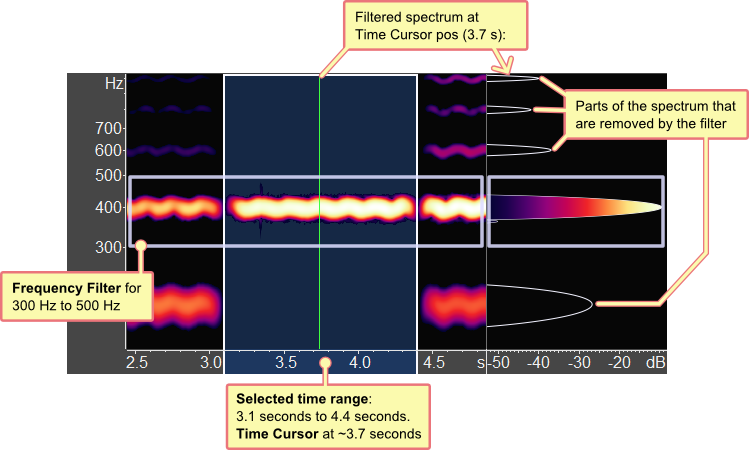
When using filters, the original, unfiltered spectrum is drawn as an outline:
Automatically install updates
New versions can now be installed with the click of one button. This should make it more convenient to keep the software up to date.
Bugs fixed:
Fix the line thickness of the zoomed waveform.
Image export dialog might be included in the exported image under some conditions.
Spectrum filtering could be stuck with showing the wrong content.
“Apply filters permanently” did not correctly use filters with custom strength values.
Loading and re-saving mp3 files did not work.
Textual cursor info on spectrum had the wrong position when “note name” was not shown.
https://www.vocevista.com/img/VoceVista_WebLogo156a.png00Bodo Maasshttps://www.vocevista.com/img/VoceVista_WebLogo156a.pngBodo Maass2021-03-02 09:08:322021-03-02 09:08:32VoceVista Video 5.4.2
This release of VoceVista Video 5.4.0 has been cooking for almost a year and brings several major new features, as well as many smaller improvements and bug fixes. This release does not yet contain documentation for the new features. We will update the user manual and add new tutorial videos for everything in the coming weeks.
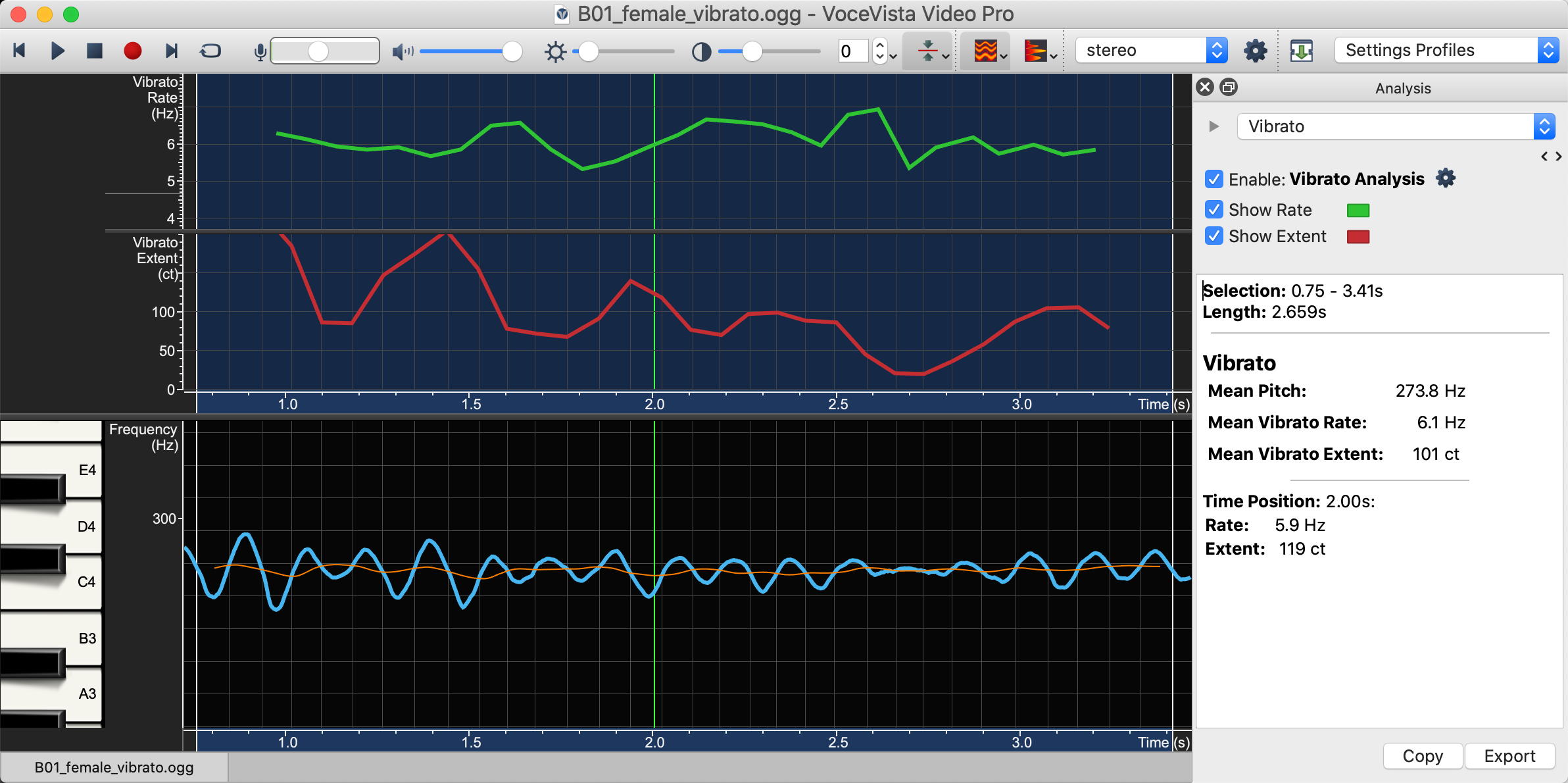
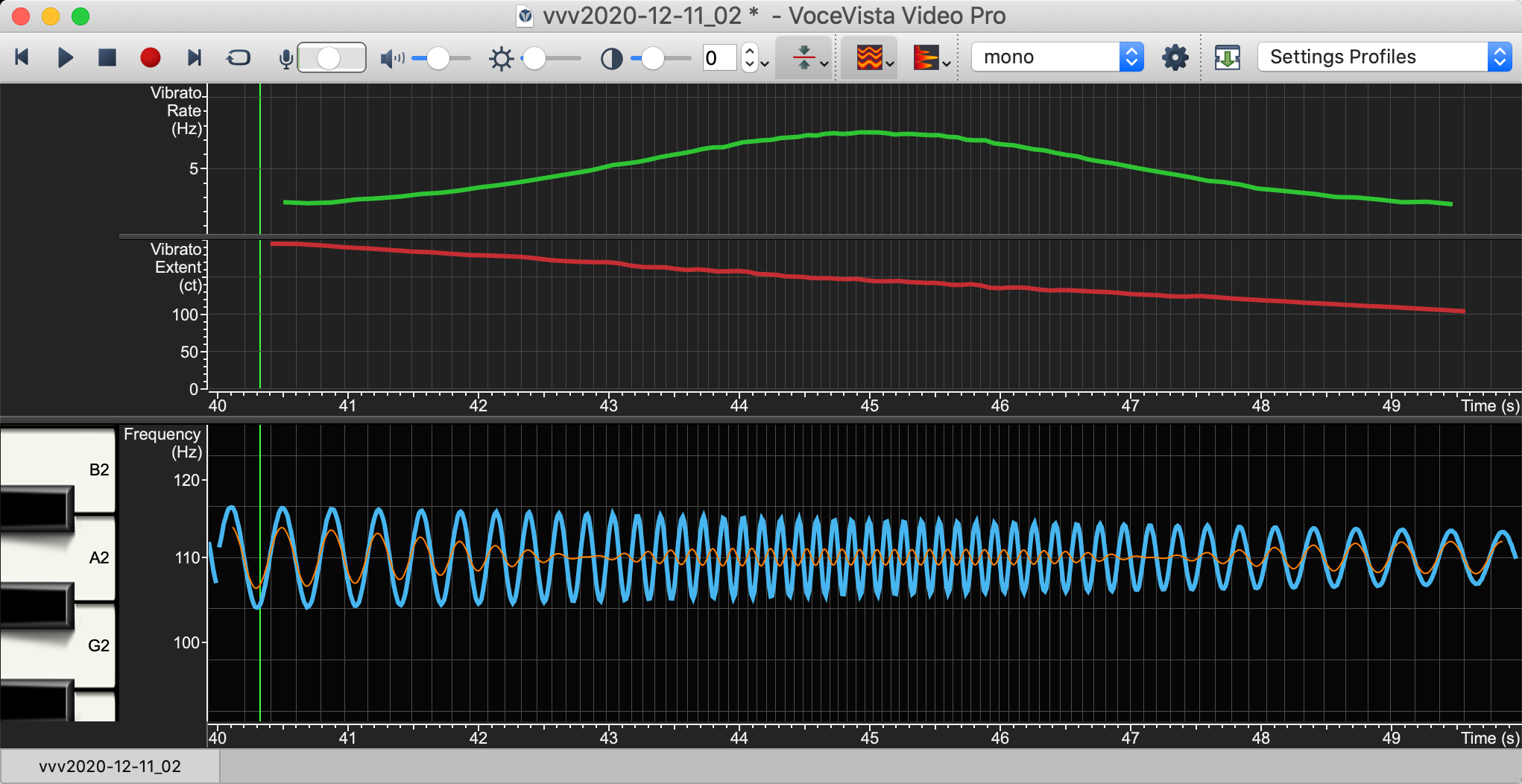
The biggest new feature in VoceVista Video Pro 5.4 is Vibrato analysis. Vibrato is a periodic fluctuation of the fundamental pitch of a singer. The vibrato analysis feature can plot the vibrato rate and extent over time, and it can show a numeric readout of the instantaneous and average values of those parameters. Here is a video tutorial for this feature:
EGG Wavegrams
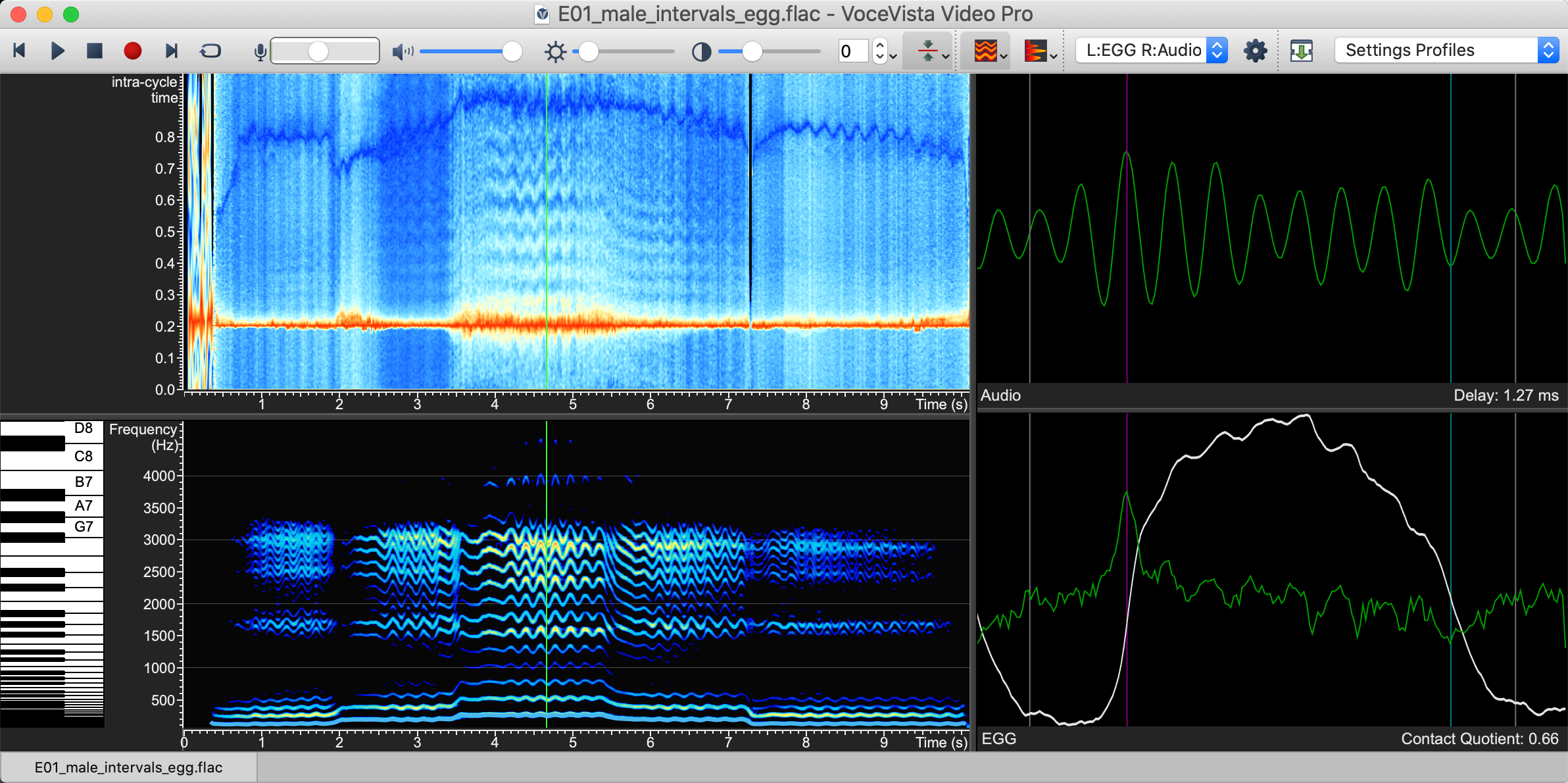
The electroglottograph (EGG) display now officially supports the EGG Wavegrams developed by Dr. Christian Herbst. Similar to how the spectrogram can visualize how the spectrum changes over time, the EGG and dEGG Wavegrams visualize how the EGG and its derivative change over time, so that the entire history can be visalized in a single image.
Improved Long Term Average Spectrum
Various bugfixes and workflow improvements were made to showing the Long Term Average Spectrum.
Marker list improvements
The theming of the marker list has been revised to give a better visual grouping of a file and its markers. Also, the workflow for selecting and managing markers has been revised and improved.
All editions (VoceVista Video Pro, VoceVista Video, Overtone Analyzer)
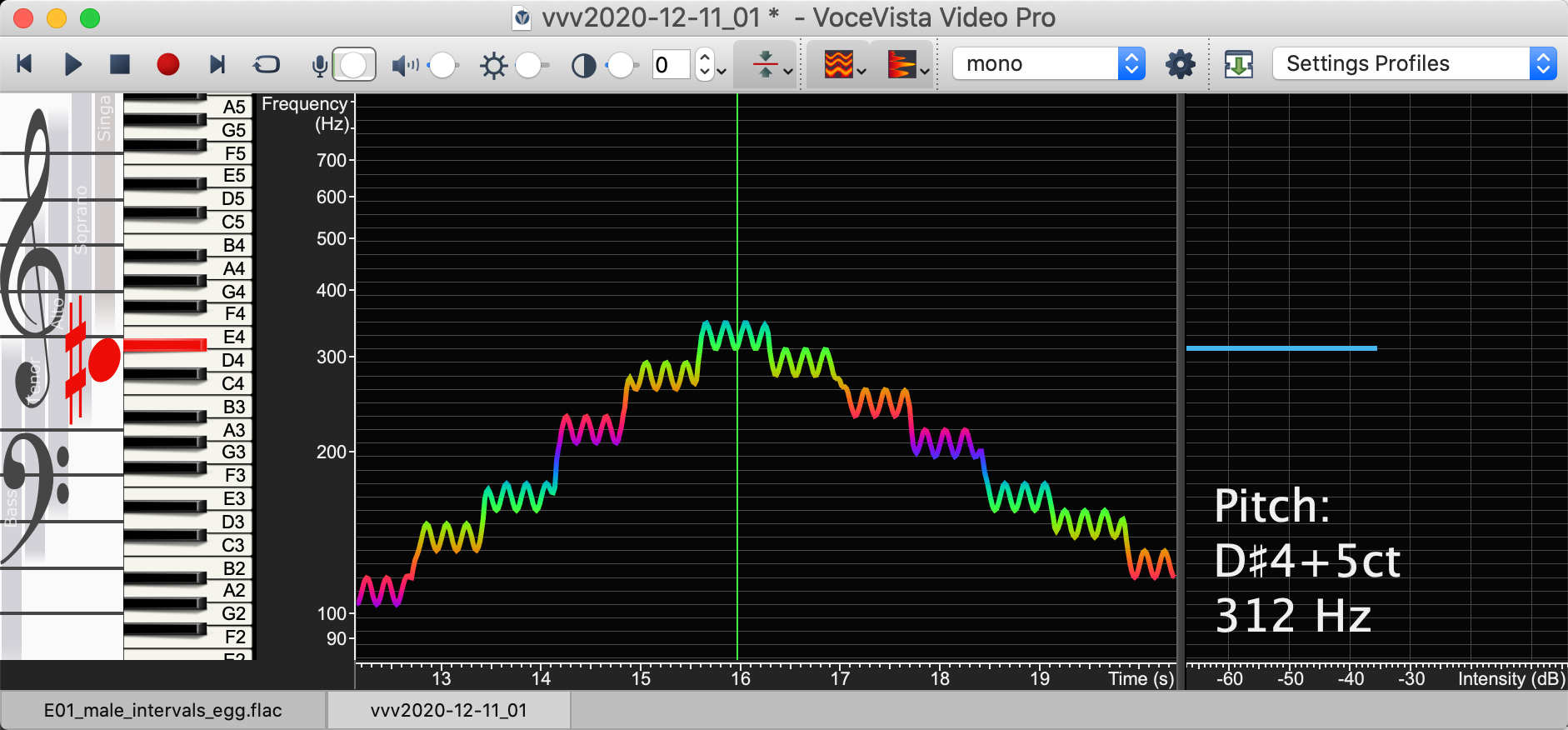
Real-time pitch display during playback and recording
During recording and playback, the current pitch is now shown in real time, and the detected musical note can be shown on the piano and the staff view.
Improved accuracy when tracking pitch of singing voice
When singers put a strong emphasis on their higher harmonics, the pitch tracking might pick those harmonics as the fundamental pitch, because in a mathematical sense, they might be the strongest periodic component of the sound. With the new feature prefer harmonic fundamental, the pitch tracker will find the fundamental at the base of the harmonic series, even when the higher harmonics are very strong. This makes pitch tracking for singing much more robust.
Color pitch line by frequency
In addition to having a flat color for the pitch line, this line can now be colored by frequency. The colors will repeat for each octave. This can be enabled unter Preferences / Frequency Scale / Color by Frequency. Thanks to Heidi Moss for requesting this feature.
Improved Sound Generator
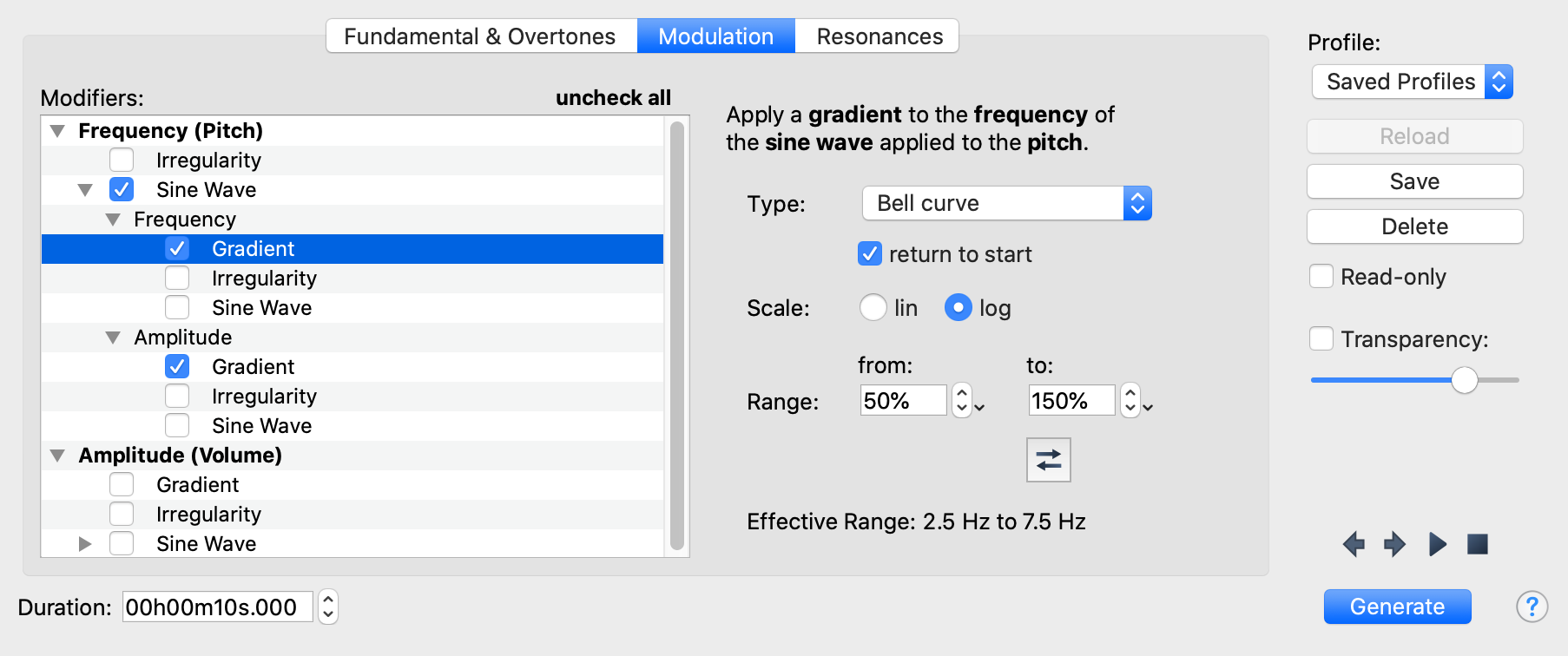
The Sound Generator now has much richer simulation options, including second-order modifiers to create dynamics, and to change speed and extent of vibrato over time. In the picture above, the vibrato rate follows a bell curve to change smoothly from 2.5 Hz to 7.5 Hz and back, while the vibrato extent follows a linear curve from 100 to 50 cent.
More audio backend options
Under Preferences / Advances Settings / Audio Performance, you can now select a new audio backend (“Backend R”) for better compatibility on some MacBook models. On Windows, this will allow to record through the “ASIO” framework, which offers very low latency on high end sound cards.
Smooth colormap interpolation
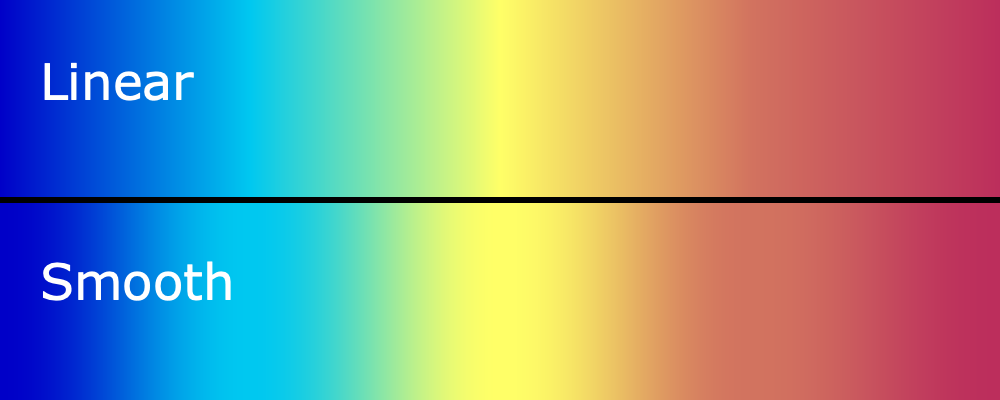
So far, all colormaps have used linear interpolation between their control points. This may cause some sharp spikes, such as in the yellow part in the middle of the colormap above. With the new “Smooth” color interpolation method, the colors flow more naturally into each other without any spikes.
Selection Period and Frequency
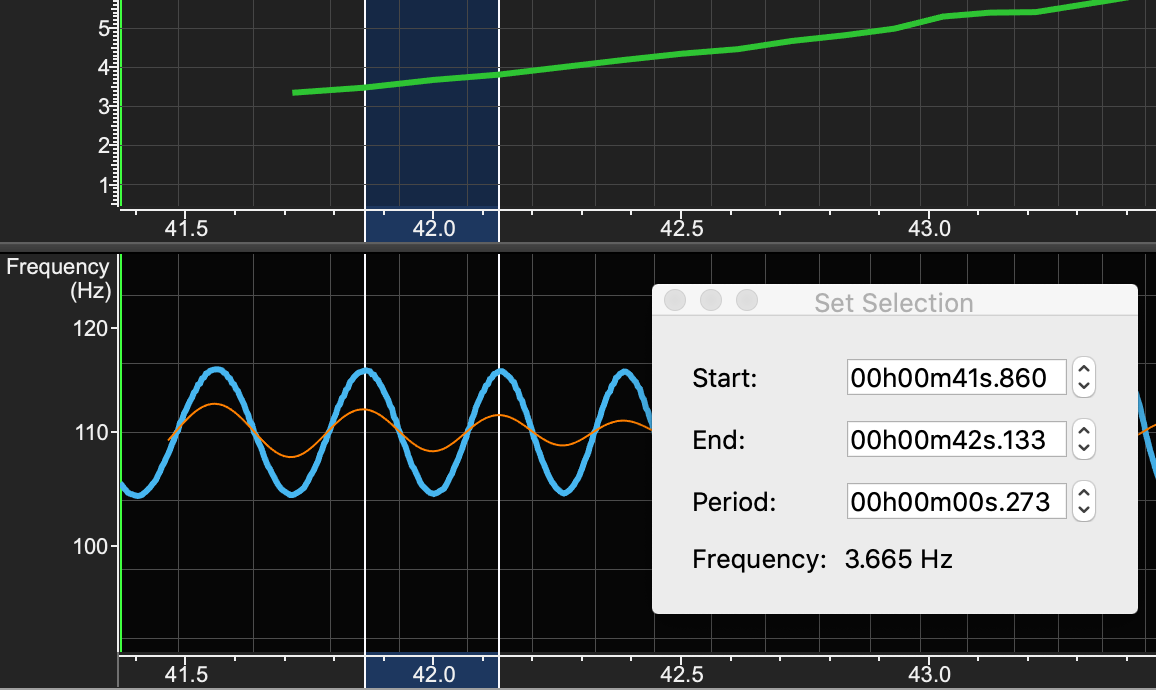
For selected time ranges that are shorter than one second, the inverse of the selected period is automatically displayed as frequency. This allows to verify the period and frequency of vibrato cycles, or even individual vocal fold vibrations.
Smaller changes
VVVP only
check all and check none buttons on Profile manager, and other places
require ALT key when moving markers on spectrogram
support for multi-user installations and offline activations
support for automated installations
VVVP and VVV
improvements to Export Image dialog
fix some bugs related to window tiling
in Vowel Chart, disable snapping to resonance matrix when ALT is pressed
open multiple files at once when using the “Open file” command
All editions (VVVP, VVV, OA)
improved support for Retina displays
new crash handler for better error diagnostics
group secondary time scales to simplify the view menu and other places
enhanced context menus for secondary views to show the name of the view and allow to hide it
Preferences now have many shortcut buttons to directly change the color of certain display elements such as pitch and mean pitch lines
listbox rows are themed with alternating colors
fix some bugs with importing .m4a files and other compressed file types
revise and rename included sample files
fix alignment issues on status bar
Known issues
Saving as mp3
On macOS, the Save As dialog doesn’t show the choice of file extension by default. This is a glitch. To make the file type choice visible, for example if you want to save as .mp3, switch to another app and then back to VoceVista Video.
https://www.vocevista.com/img/VoceVista_WebLogo156a.png00Bodo Maasshttps://www.vocevista.com/img/VoceVista_WebLogo156a.pngBodo Maass2020-12-11 11:36:372021-01-19 11:31:02VoceVista Video 5.4.0
This is a service release to fix recording on macOS 10.12 and 10.13, which had been broken in VVV 5.3.3 due to the recent changes made to support macOS 10.15 Catalina.
If you are running VoceVista Video 5.3.3 on macOS 10.14 or 10.15, or on Windows, you don’t need to do anything.
If you still run macOS 10.12 or 10.13, please upgrade to this version VVV 5.3.4.
Also, on some specific Macbook Air models, the recording produces a distorted sound. If you experience this issue, please check out this page for a beta version and a fix.
https://www.vocevista.com/img/VoceVista_WebLogo156a.png00Bodo Maasshttps://www.vocevista.com/img/VoceVista_WebLogo156a.pngBodo Maass2020-06-03 12:54:372020-06-03 12:54:37VoceVista Video 5.3.4
This is mostly a service update to fully support macOS 10.15 Catalina.
Known issues
No recording on macOS 10.12 and 10.13: The changes made to support macOS Catalina turned out to be incompatible with older macOS versions. Please download the latest beta version from our support page.
No pitch line if spectrogram is turned off. The pitch line will only be displayed if the spectrogram is enabled. To hide the spectrogram, you can adjust the brightness and contrast sliders to make it invisible. Fixed for Version 5.4.0
https://www.vocevista.com/img/VoceVista_WebLogo156a.png00Bodo Maasshttps://www.vocevista.com/img/VoceVista_WebLogo156a.pngBodo Maass2020-04-27 13:32:472020-04-27 13:32:47VoceVista Video 5.3
This update brings many changes under the hood for improved stability and performance. The biggest new feature is the Sound Generator, which enables a large number of exercises and experiments for better understanding of acoustics and voice science. Check this space for upcoming tutorial videos.
New Features
Sound Generator, for additive synthesis of sounds and for simulating vocal tract resonances
playback of note sliders to separate ears for binaural experiments
record output of generated sounds from the piano, the note sliders, and the Vowel Chart
faster mp3 encoding
the Vowel Chart can now be customized, which means the position of the vowels can be rearranged
new nomenclature for resonance frequencies. Instead of talking about formants, the vocal tract resonance frequencies are now labelled fR1, fR2, etc.
Bug Fixes
This release contains a large number of bug fixes and performance improvements, as well as preparations for several exciting new features to come very soon.
https://www.vocevista.com/img/VoceVista_WebLogo156a.png00Bodo Maasshttps://www.vocevista.com/img/VoceVista_WebLogo156a.pngBodo Maass2019-04-30 14:02:282019-04-30 14:02:28VoceVista Video 5.2.0
This update has taken much longer than originally planned because we had to change quite a lot of stuff under the hood to prepare the app to support the Electroglottograph (EGG) display. Most notably, all editions now have better support for stereo files and allow switching the displayed stereo channel on the fly.
This version also completes all features from Overtone Analyzer 4.0 that were still missing, such as the textual pitch and cursor info display on top of the spectrum.
This is a free update for all users of VoceVista Video / Overtone Analyzer 5.x. If you have a license for those programs, you can simply download the latest edition from our download page and install it over the old one. To upgrade from the older Overtone Analyzer 4.0, please contact us for details about how to buy a renewal license.
Here are the individual changes:
New Features
support for the Electroglottograph (EGG) in VoceVista Video Pro
improved support for storing the contents of one window in another for comparison
export recordings as mp3
change stereo channel display on the fly
frequency filters work in stereo now
textual pitch and cursor info display on top of the spectrum:
Bug fixes / Detail improvements
There are a lot of fixes and improvements in this release, too many to list all of them. Here are some of the more important ones:
better fading in and out (to avoid loud pops) when playing the selection in a loop, and while dragging the visible rectangle
support for resizing the selection while looping, even when looping very short sections
review workflow for creating Markers and using Marker List
better support for horizontal spectrogram orientation
better default file names
refresh tabs more consistently when file names have changed
fix various crashes
fix file corruption when opening wave files with unknown chunks
support for macOS 10.13
fix various scaling issues for retina screens
make more colors adjustable in the Fonts and Colors settings (such as LTAS line)
https://www.vocevista.com/img/VoceVista_WebLogo156a.png00Bodo Maasshttps://www.vocevista.com/img/VoceVista_WebLogo156a.pngBodo Maass2018-08-04 10:36:262018-08-06 12:45:09VoceVista Video 5.1.0