
Modulation
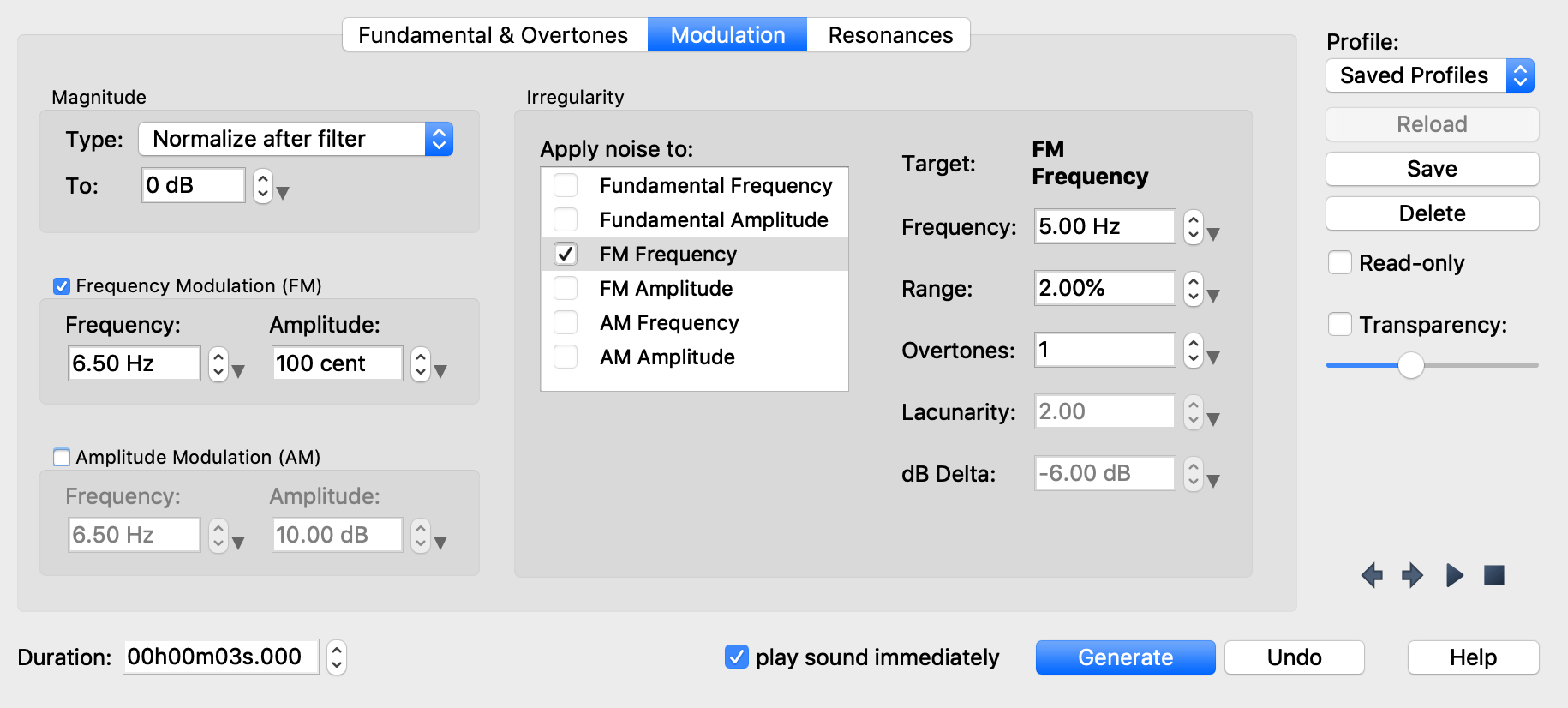
The Modulation tab changes the pitch and the volume of the generated sound while it plays: a vibrato, a tremolo, a fade, or irregularities that make the sound less "computerized". On the left is the tree of modifiers, and on the right are the settings of the modifier selected in it.
Modifiers
The tree has two branches, one for the pitch and one for the volume of the generated sound. Each modifier has a check box that turns it on:
-
Frequency (Pitch)
-
Irregularity
-
Sine Wave: a vibrato
-
Frequency: Gradient, Irregularity, Sine Wave
-
Amplitude: Gradient, Irregularity, Sine Wave
-
-
-
Amplitude (Volume)
-
Gradient
-
Irregularity
-
Sine Wave: a tremolo
-
Frequency: Gradient, Irregularity, Sine Wave
-
Amplitude: Gradient, Irregularity, Sine Wave
-
-
Selecting a modifier shows its settings on the right, below a line that says what it applies to. Frequency (Pitch) and the Frequency and Amplitude entries only group the modifiers below them and have no settings of their own. Amplitude (Volume) shows the normalization settings.
The modifiers under a sine wave’s Frequency and Amplitude change that sine wave itself: a vibrato that becomes faster, for example, or a tremolo that becomes deeper. Turning on such a modifier also turns on the ones above it, since it only acts through them. uncheck all turns every modifier off.
The pitch branch is available only while the fundamental is a Sine Wave and its pitch type is not Click Track, both set on the Fundamental and Overtones tab.
Units
The amount of an irregularity or a sine wave is in cent where it changes a frequency (1200 cent are an octave), in percent where it changes an amplitude, and in dB for the sine wave on the volume. A percentage works on a ratio: with 50 %, the value rises to 1.5 times its normal size and falls to 1/1.5 of it. A gradient’s Lin (%) scale is different: there a percentage is a share of the value, so 100 % leaves it unchanged and 50 % halves it.
| Sound Generator profiles saved with earlier versions are converted when they are loaded, so they sound as before, but many of their amounts show different numbers now. Earlier versions read every irregularity as 12 times its number in cent, and the amplitude of every sine wave as cent, whatever unit the field showed. A pitch irregularity of 1 cent now shows as 12 cent, a volume irregularity of 10 % as 7.18 %, a tremolo of 50 dB as 0.3 dB, and a sine wave of 50 % on the amplitude of a vibrato as 2.93 %. Sine waves on a frequency keep their numbers. |
Normalization
Shown when Amplitude (Volume) is selected. Normalization sets the overall intensity of the generated sound.
- Normalize after resonance filters
-
The sound is normalized to the Level after the resonances have been applied.
- Normalize before resonance filters
-
The generated sound is normalized before it is filtered through the resonances. This can be used to compare the relative strength of different resonance settings. If the initial sound is too loud, this will generate clipping, so start with very low values, such as -40 dB.
- Don’t normalize
-
The sound keeps the intensity it was generated with.
- Level
-
The level, in dB, to normalize to. It is unavailable with Don’t normalize.
- Compress dynamic range
-
Normalizes the sound over the Interval rather than as a whole. A short interval flattens the volume, a long one preserves the dynamic range.
Irregularity
Irregularity adds noise to the pitch, to the volume, or to the frequency or amplitude of a vibrato or tremolo, which prevents sounds that appear too "computerized" and unnatural by being too perfectly regular. The added noise is coherent noise: it is not truly random, but has a frequency and an amplitude. To add pure white noise, use the setting on the Fundamental and Overtones tab.
There is some overlap between the ways of adding irregularity, because ultimately all of them change either the frequency or the amplitude of the sound: directly, on the pitch or the volume, or indirectly, through the vibrato or tremolo.
- Frequency
-
The fundamental frequency of the noise generator. For human singers, a value of 5 Hz is a good starting point for many irregularities in the voice. You can also set values that change extremely slowly by entering frequencies such as 0.1 Hz, or even 0.01 Hz.
- Range
-
The most the affected value goes up and down. For the pitch and for the frequency of a vibrato or tremolo, it is set in cent, up to 2400. For the volume and for the amplitude of a vibrato or tremolo, it is set in percent, up to 1000 (see how percentages work).
- Overtones
-
The number of overtones for this noise generator. If it is set to 1, there is only one level of noise at the given frequency. With more than one overtone, higher frequencies of noise are added.
- Lacunarity
-
This determines the spacing between overtones. More precisely, it is the frequency ratio of successive overtones. This setting is equivalent to the Multiply by setting for overtone spacing. A setting of 2.0 means that all overtones are octaves of the fundamental.
- dB Delta
-
The intensity change, in dB, from each overtone of the noise to the next: negative values make higher overtones weaker. This is equivalent to the dB/Overtone setting for the overtone amplitude.
Sine Wave
A sine wave changes its target periodically. Under Frequency (Pitch) it is a vibrato (frequency modulation), under Amplitude (Volume) a tremolo (amplitude modulation). The sine waves under a vibrato’s or tremolo’s Frequency or Amplitude make that vibrato or tremolo itself vary periodically.
- Frequency
-
How many times per second the target goes up and down. In singing, typical values of a singer’s vibrato are around 6 Hz.
- Amplitude
-
The amount by which the target goes up and down. It is set in cent for the pitch and for the frequency of a vibrato or tremolo (100 cent mean that the pitch goes up and down by a semitone), and in dB for the volume, where a tremolo of 6 dB lets it rise and fall by 6 dB (the default is 3 dB). For the amplitude of a vibrato or tremolo, it is set in percent (see how percentages work).
Gradient
A gradient changes its target steadily over the duration of the generated sound. On the volume, for example, it makes a fade in or out, and on a vibrato’s frequency, a vibrato that becomes faster.
- Type
-
How the curve moves between from and to: Straight line, Bell curve, or Steps.
- Return to start
-
The curve moves back to from after reaching to.
- Scale
-
Lin (%) gives from and to in percent of the value the gradient changes, so that 100 % leaves it unchanged. log gives them in dB for the volume and in cent for frequencies, as its label shows. Switching between the two converts the values.
- Range
-
The from and to values. The button between them swaps them.
- Steps, Size
-
Shown for the Steps type: the number of steps and the size of each. When the pitch moves in steps, as set by the pitch type on the Fundamental and Overtones tab (a scale, a triad or intervals, for example), the gradient takes its steps from the pitch: the number of steps can’t be changed then, and Return to start is unavailable.
- Effective Range
-
The range in the target’s own terms, such as Hz for a frequency or dB for the volume.
Amplitude, magnitude and intensity
The words intensity, magnitude, amplitude, and loudness all refer to how loud the generated sound is, each with a slightly different meaning. When referring to individual points in time of a waveform, amplitude is the maximum deviation of the waveform away from its center, so it can be positive or negative. Magnitude is the absolute value of the amplitude. When referring to a longer waveform rather than individual points in time, amplitude and magnitude are often used synonymously, and in that case they both mean the absolute value of the maximum deviation from the center. Intensity is a synonym for magnitude.
Amplitude, magnitude, and intensity can be measured in linear values, or in decibel. A value of 0 dB is the maximum intensity that can be represented in a digital waveform. It corresponds to a linear amplitude of 1.0. A value of -6 dB corresponds to a linear amplitude of 0.5, a value of -12 dB corresponds to a linear amplitude of 0.25, a value of -18 dB corresponds to a linear amplitude of 0.125, etc.
Loudness is a subjective measure that refers to how loud a sound is perceived by the listener. This depends on many factors such as the speakers used, their volume settings, and the ears of the listener. Therefore the software cannot say much about the perceived loudness of the sound, but it can indicate the relative intensity of the sound in qualitative terms, and it can indicate the mathematical magnitude of the sound.