
VoceVista 6.0
We are finally putting the Video in “VoceVista Video”. Version 6.0 makes video a first-class part of VoceVista: record from a camera or open a video file, play it in sync with the sound analysis, step through it frame by frame, and make light edits. Add a separately recorded audio track, and VoceVista lines it up with the video for you. Then export the edited video, or turn the analysis itself into a precise video.
Version 6.0.2 is the first official release of VoceVista 6.0. It follows the public beta 6.0.1 and adds, among other things, the video filmstrip, EGG statistics, the spectrum noise floor and six new interface languages.

Highlights of this release:
- Integrated video: record, play, step frame by frame, edit and export (VoceVista Video and Pro)
- Add a second audio track and have it synchronized automatically (VoceVista Video and Pro)
- Projects that keep video, audio tracks and edits together (VoceVista Video and Pro)
- Export View as Video: the analysis as a video with a constant frame rate (VoceVista Video and Pro)
- Dark mode
- Trackpad gestures on macOS: directional pinch-to-zoom and swipe scrolling with momentum
- Stereo channels as separate tracks in the Waveform and Timeline
- A noise floor for the spectrum: see its lowest levels without changing the spectrogram
- A Sample Library with example recordings to download
- EGG and pitch range statistics (VoceVista Pro)
- Six new interface languages
- New edition names: VoceVista Basic, VoceVista Video and VoceVista Pro
New Edition Names
With 6.0 all three editions carry the VoceVista name:
| Edition | Formerly | What it adds |
|---|---|---|
| VoceVista Basic | Overtone Analyzer | Real-time pitch and spectrum analysis |
| VoceVista Video | VoceVista Video (unchanged) | Video, Frequency Filters, side-by-side comparison, Vowel Chart |
| VoceVista Pro | VoceVista Video Pro | High-resolution measurement, Markers, Statistics, LTAS, Vibrato Analysis, EGG |
“VoceVista” on its own now refers to the application as a whole. The top edition drops “Video” from its name because every edition from VoceVista Video up includes the video features.
Existing licenses carry over: an Overtone Analyzer license activates VoceVista Basic, and a VoceVista Video Pro license activates VoceVista Pro. Your settings come along too. On Windows, the installer replaces your 5.x installation. Version 6.0 needs a license whose update period covers it. If yours has ended, you are told before anything is changed and can renew from there.
New Features: All Editions
Dark Mode
VoceVista now has a dark theme. Choose Follow System, Light or Dark in Settings > Advanced Settings > User Interface > Appearance. The analysis views, icons and dialogs all follow the theme.
Trackpad Gestures on macOS
On a Mac trackpad you can now zoom and scroll with the gestures you know from other apps.
- Pinch to zoom. With directional pinch, the direction of your fingers decides what zooms: horizontal for time, vertical for frequency, diagonal for both. Simple pinch zooms the main axis of the view.
- Swipe with two fingers to scroll, with the same momentum as elsewhere in macOS.
- Gestures work in the Long-Term and Short-Term views, the Waveform, the scales, the EGG and vibrato views and the Vowel Chart.
- Choose directional or simple pinch in Settings > Navigation > Trackpad.
- Help > Show Trackpad Gesture Help shows which gesture was recognized and what it does.
Stereo Channels as Separate Tracks
The Waveform and Timeline can show the left and right channels of a stereo file as two tracks. Right-click the Waveform or Timeline and choose Show Stereo Channels as Separate Tracks, or set it in Settings > Analyzer View > Waveform. Buttons on each track enable, solo or hide it, and the analysis and playback follow the tracks you enable.
Spectrum Noise Floor
The spectrum and the spectrogram share one dynamic range, so a range that suits the spectrogram often cuts off the bottom of the spectrum. The new Noise Floor setting in Settings > Colormap Editor extends the spectrum below the dynamic range by the number of decibels you choose, so you can see its noise floor while the spectrogram stays as it is.
- To change it directly, hold Ctrl (⌘ on a Mac) while you drag the intensity scale of the spectrum.
- The normalized spectrum is not affected.
Sample Library
Help > Open Sample File… opens the new Sample Library: example recordings and settings profiles, grouped by type and filtered by tags. A sample is downloaded when you first open it, so the installer is smaller and the library can grow between releases.
Files Reopen the Way You Left Them
When you reopen a file, VoceVista restores the zoom, the visible range, the playback position and the selection. A file that was changed in another program since then opens with the default view. You can turn this off in Settings > Advanced Settings.
Recording
- System audio on macOS: record what your Mac plays, for example a video call, with the system audio recording source (macOS 14.4 or later).
- Noise suppression on Windows: many microphones on Windows have noise suppression or other enhancements switched on, which also remove quiet parts of the voice. VoceVista now detects this and offers to turn them off. A new option in Advanced Settings records without these enhancements and leaves the Windows settings alone.
- ASIO: VoceVista no longer changes the buffer size of ASIO devices. It uses the size set in the driver’s control panel.
Export Audio
File > Export Audio… saves the recording or the selection in the format of your choice, with quality settings for each format. Export the audio as edited, or as you hear it, with frequency filters and playback speed applied. You can also choose the time range: the selection, the visible range or the whole recording.
Navigation
- Zooming is now lossless: zoom in and back out, with the mouse wheel or a pinch, and you are exactly where you started.
- The view scrolls along when you move the cursor near its edge.
- Dragging the time scale no longer moves the playback cursor.
- Esc closes Settings and most dialogs.
Six New Languages
VoceVista is now also available in Catalan, Czech, Italian, Swedish, Traditional Chinese and Turkish, for 15 interface languages in all. The English texts were reviewed for clarity and consistency, and the translations in all languages were brought up to date.
More
- VoceVista appears in Open With for supported audio and video files on macOS and Windows, without taking over the default app.
- Help buttons in many more dialogs open the matching page of the online manual.
- A new Waveform page in Settings > Analyzer View collects the Waveform options.
- Decimal numbers follow your system’s regional settings throughout the app.
New Features: VoceVista Video and Higher
Fully Integrated Video
Open a video file and it plays in sync with the sound analysis. It is a player for inspecting a performance, not an editing workstation.
- Step frame by frame in both directions with the keyboard, or with Shift and the mouse wheel. VoceVista keeps nearby frames in memory, so stepping and scrubbing stay smooth.
- Zoom, pan, rotate and mirror the image. Fit Frame to Video also trims black bars that are part of the video itself.
- Place the video where it suits you: floating over the analysis (the default), above it, next to the Waveform or Timeline, or maximized. Right-click the video to choose.
- Move the mouse over the video for playback controls, a seek bar, the playback speed and 10-second skips.
- Video Filmstrip shows thumbnails along the Waveform and Timeline. Turn it on in their context menus.
- HDR videos from iPhone play with correct colors, and videos without a sound track open too.
Record from a Camera
Record video together with the audio from a webcam or another camera. A live preview shows the picture before you start. Choose the camera, the resolution, mirroring and where the video appears in Settings > Recording > Video, where you can also adjust the camera’s own settings. Recording uses your computer’s hardware video encoder where available.
Edit Video and Save Projects
- Trim, cut, copy, paste and delete apply to the video together with the audio.
- Save your work as a project (.vvproj). A project keeps the video, the audio tracks, your edits and the view together, and it refers to the original media files. When you save a video, or an edited compressed audio file, VoceVista offers to save a project.
- Save Project As can copy all media into the project folder, so you can archive the project or move it to another computer.
- File > Project Media… lists the media files a project uses, with their format, length and location.
Add a Second Audio Track
Did you record the sound separately, for example with a better microphone than the camera’s? File > Add Second Audio Track… imports it and lines it up with the camera’s own sound automatically. Fine-tune the offset with Adjust Track Offsets, and enable, solo or hide each track with its buttons on the Waveform. The second track is saved with the project.
Export Video
File > Export Video… saves the edited video. The audio can be stored without loss (ALAC) inside the MP4 file, so the sound keeps its full quality, and the export uses the hardware encoder where available. As with audio, choose the time range and whether to export the video as edited or as played.
Export View as Video
File > Export View as Video… turns the playback of a time range into a video of the analysis views, with sound. VoceVista renders the video frame by frame instead of capturing the screen, so it has a precise, constant frame rate however fast your computer is. The playback speed is honored: at half speed the video is twice as long. Choose the views to include, the frame rate and the quality. The camera video can be part of it.
Image Export
Image export now offers PNG, JPEG and WebP, with a quality setting for JPEG and WebP, and it can include the video picture. Views you select for export are turned on for you.
Open Web Link
File > Open Web Link… has several improvements:
- Choose between audio only and audio with video, and pick the formats separately.
- Websites that ask you to sign in can use the sign-in of your web browser.
- Clearer messages when a download fails, and automatic retries when a site limits downloads.
- The download component runs in a restricted sandbox for extra security.
New Features: VoceVista Pro
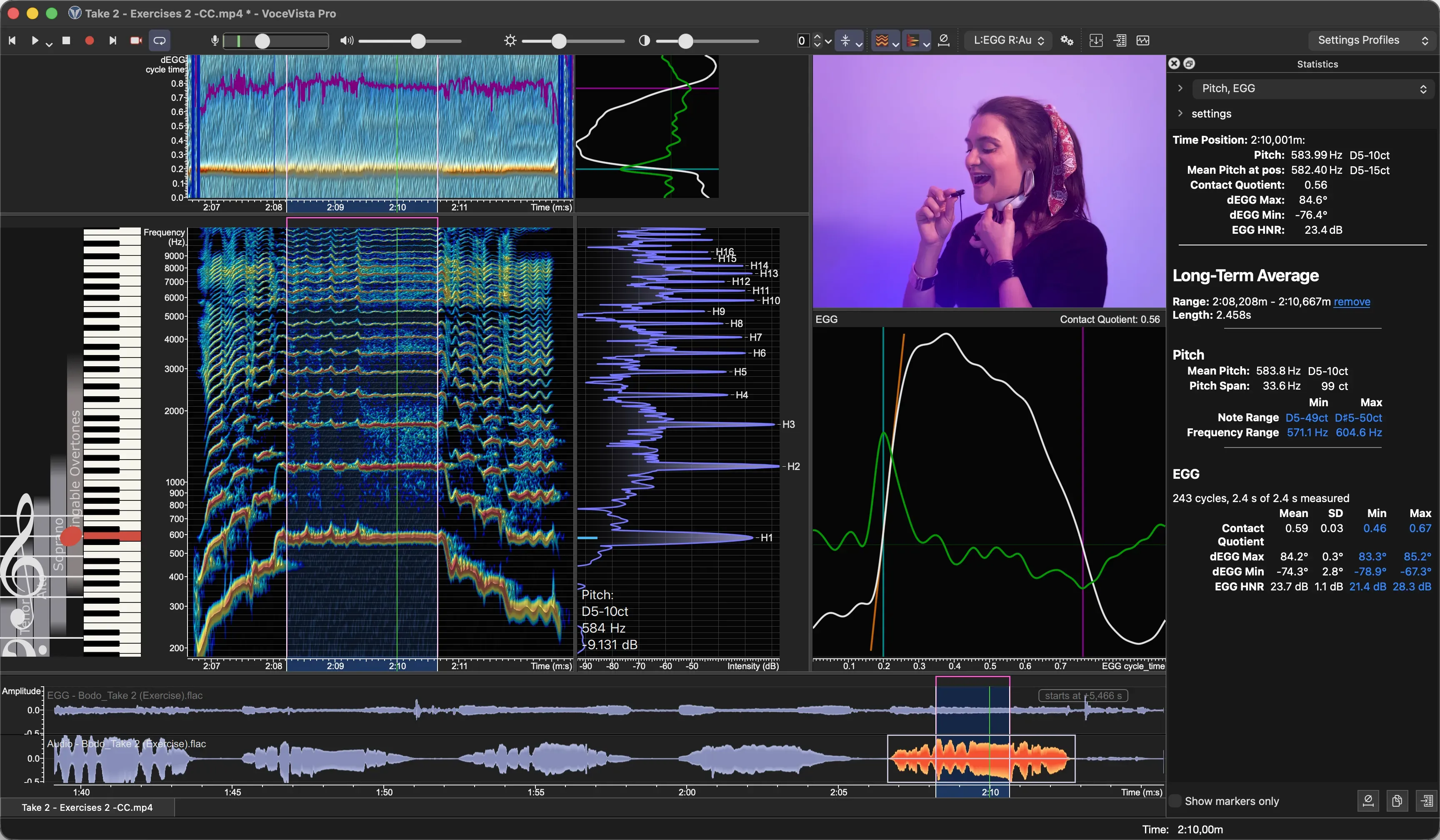
EGG Statistics
The Statistics panel now reports EGG measurements for the selection or a marker: Contact Quotient, dEGG Max, dEGG Min and EGG HNR, which shows how periodic and noise-free the EGG signal is. The lowest and highest values are links that take you to their position. File > Export Data… exports the EGG statistics too.
Pitch Range Statistics
For a selection, the Statistics panel now shows the mean pitch and the pitch span, plus the lowest and highest note and frequency. Here too, the extremes are links to their position in the recording.
Revised EGG Analysis
- A new filter in front of the EGG analysis removes a bias in its pitch and EGG HNR. Values measured with 6.0 can therefore differ from 5.x, and EGG HNR reads higher.
- The glottal opening is found more reliably in noisy recordings.
- During a recording, the EGG views show the newest data, and a briefly unclear cycle no longer blanks the display.
- Whether a channel holds audio or EGG is saved with the file.
- Export Data has a new EGG History sheet with the contact quotient and pitch over time.
Markers
- Marker search now finds parts of words, ignores case and highlights what it found.
- Clean Up Marker History in Advanced Settings removes the entries of files you haven’t opened for a while.
- Drag a marker or its edge past the end of the marker strip and the view scrolls along.
- Markers show a tooltip with their name, their position and how to move them.
- Ctrl+click (⌘+click on a Mac) selects several markers.
- Activating a marker that is already visible no longer scrolls the view.
Several Windows of the Same File
Windows that show the same file now stay consistent: edits, undo, selection and playback position carry across them. VoceVista reopens a file with all its windows as they were.
Improvements
- After saving, a file reopens without recalculating its analysis data.
- 24-bit and 32-bit FLAC files are read at their full resolution.
- Sound Generator: modulation amounts are applied in the unit shown (cents, dB or percent). Profiles from older versions are converted, so they sound as before.
- Long operations, such as the System Check, adding a second audio track or exporting the EGG History, show their progress and can be cancelled.
- Check boxes in lists respond to every click, also when you click quickly.
- The display recovers after sleep or a graphics driver reset instead of freezing.
- On Windows, the crash reporter now also catches hangs and more kinds of errors, and each report includes the log of the session that crashed.
- On Windows 11, VoceVista uses the Windows 11 style.
- Faster drawing of the scales and the piano.
Fixes
- Crash recovery: a recording that could not be restored after a crash could be lost. Such takes are now kept as complete WAV files in a folder named after your edition (such as “VoceVista Pro Recovered Files”) in your Documents folder, and VoceVista tells you about them at the next start.
- Recording in stereo showed a mono mix in the Waveform.
- 24-bit recording of system audio on macOS produced broken audio.
- Trackpad gestures could stop responding until VoceVista was restarted.
- On macOS, the staff view toolbar came loose from the window when the window was moved.
- Fixed a possible crash when turning on the Long-Term view.
- At some zoom levels, the highlighted piano key was offset from its note.
- The FFT time window in Analyzer Settings did not keep a new value.
- Switching profiles could break the toolbar icons.
- Exported files could get an empty name or a doubled extension.
- Insert Generated Sound: Cancel inserted the sound anyway.
- Export MIDI: “Adjust pitch to nearest piano note” worked the wrong way round.
- Mouse pointer and check box display problems on macOS Tahoe.
Since the Public Beta
If you tested the public beta 6.0.1, these are the main additions in 6.0.2:
- Video Filmstrip, and smoother frame stepping with the new frame cache
- EGG and pitch range statistics, the EGG History export and the revised EGG analysis
- Files reopen with their previous view
- The spectrum noise floor
- Noise suppression detection on Windows, and the ASIO buffer fix
- Image export file types and quality, and time ranges for audio and video export
- Types and tags in the Sample Library
- Six new interface languages
- The new edition names, and an installer that upgrades 5.x installations
- Many fixes for problems found during the beta